# Model Exports
***Exporting models for deployment to personal or edge devices***
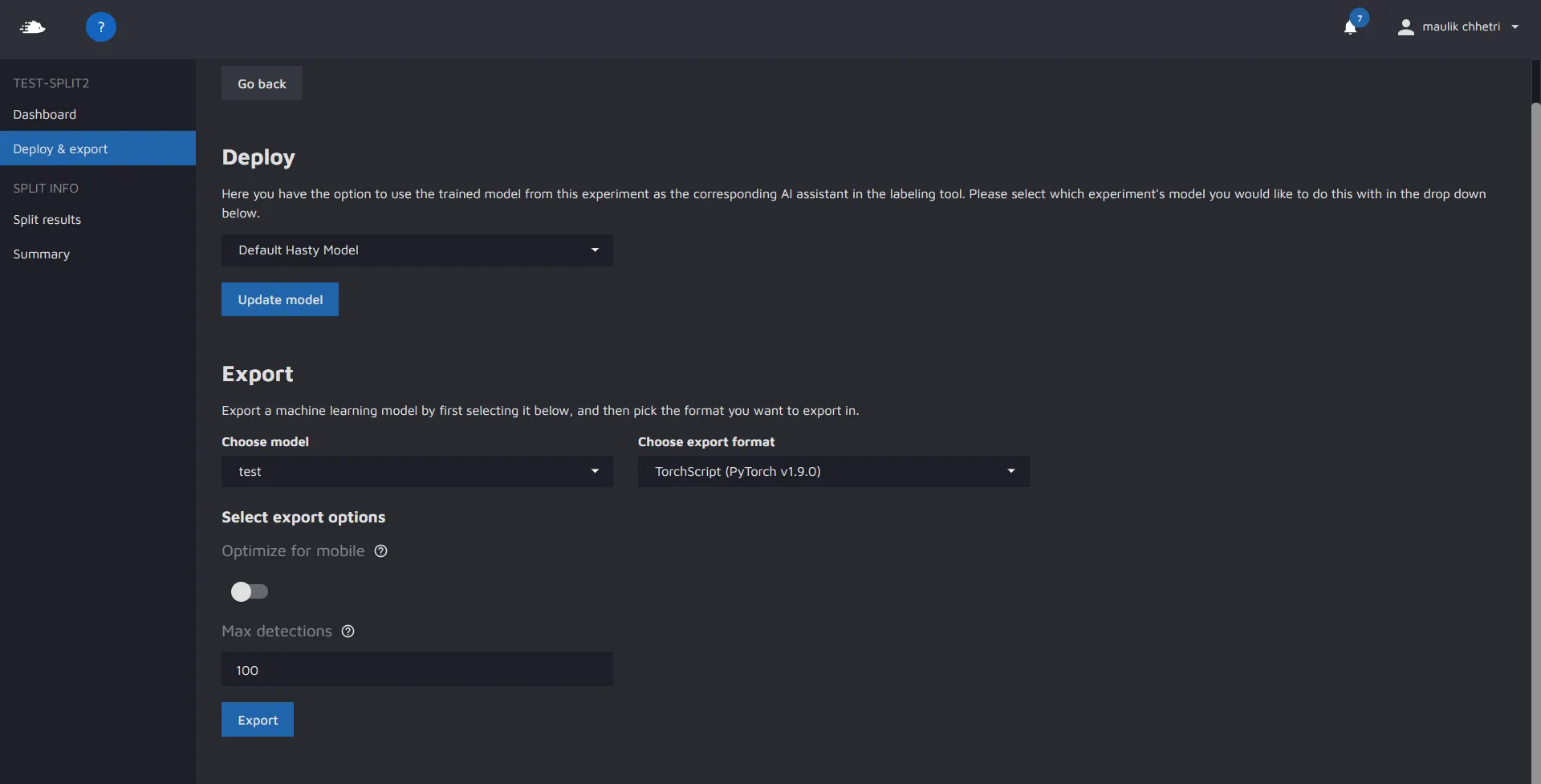
In Model Playground, you have the option of exporting the best model from an experiment. To do so, you need to navigate to the "deploy and export" page inside your split, as shown:
In the export section, you can choose which experiment you would like to export the model from, and in what format.
### Additional export options:
* **Optimize for mobile** - allows users to optimize the model for execution on a mobile device. To do so, Hasty uses the PyTorch mobile optimizer utility that performs a list of optimizations with modules in evaluation mode. To learn more about the exact optimizations, please refer to the [official PyTorch documentation](https://pytorch.org/docs/stable/mobile_optimizer.html).
* **Max Detections** - allows users to return a maximum number of detections per image during the inference.
Currently, all model families support TorchScript exports. This format can be run on CPU, GPU, and some can also be run on Android or iOS devices (depending on the model you choose). To read up on TorchScript, we recommend looking at the official documentation provided by Pytorch:
1. [TorchScript Documentation](https://pytorch.org/docs/stable/jit.html)
2. [Loading TorchScript in C++](https://pytorch.org/tutorials/advanced/cpp_export.html)
3. [TorchScript model on iOS](https://pytorch.org/tutorials/beginner/deeplabv3_on_ios.html)
4. [TorchScript mode on Android](https://pytorch.org/tutorials/beginner/deeplabv3_on_android.html)
5. [Pytorch Mobile](https://pytorch.org/mobile/home/)
More export formats will be coming in the future as model playground matures
### Exported model files:
Once you export the model and download the export file, you will need to unzip it. Unzipping it will leave you with a folder which contains the following files:
1. 'model.pt' - A torchscript compatible model file.
2. 'config.yaml' - A summary of your experiment settings - including the transforms you used.
3. 'class\_mapping.json' - A json file that maps the class integers predicted by the model to the class names that were present in your project.
4. 'transforms.json' - A json file that contains the serialized transforms used for testing/validating.
These 4 files provide all the info needed to correctly use/deploy the model on edge. We have provided some sample inference scripts for you to get started in Python. You can find these on the next pages.
---
# Agent Instructions: Querying This Documentation
If you need additional information that is not directly available in this page, you can query the documentation dynamically by asking a question.
Perform an HTTP GET request on the current page URL with the `ask` query parameter:
```
GET https://docs.cloudfactory.com/model-playground/model-exports.md?ask=
```
The question should be specific, self-contained, and written in natural language.
The response will contain a direct answer to the question and relevant excerpts and sources from the documentation.
Use this mechanism when the answer is not explicitly present in the current page, you need clarification or additional context, or you want to retrieve related documentation sections.